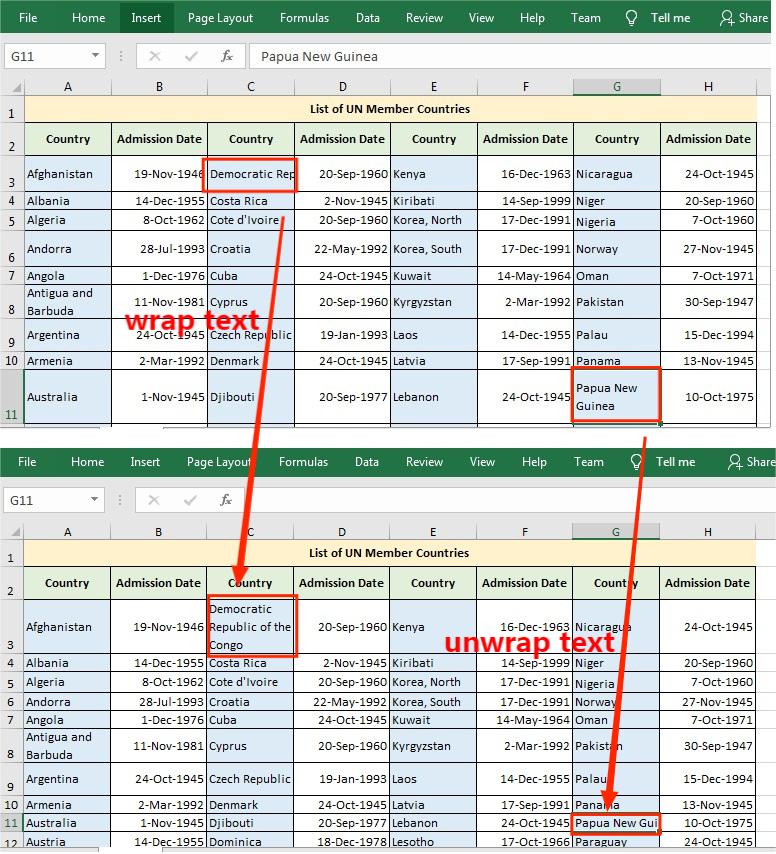
# Wrap or Unwrap Text in Excel Cells in Java
When manipulating Excel worksheets, sometimes you may find that the text in a cell is so long that some of it is hidden. At this time, it’s recommended to wrap the extra-long text into multiple lines so you can see it all. This article will demonstrate how to programmatically wrap or unwrap text in Excel cells using Free Spire.XLS for Java.
### Install the free API (2 Method)
**1#** Download the [Free Spire.XLS for Java](https://www.e-iceblue.com/Download/xls-for-java-free.html) and unzip it, then add the Spire.Xls.jar file to your project as dependency.
**2#** Directly add the jar dependency to maven project by adding the following configurations to the pom.xml.
```xml
com.e-iceblue
e-iceblue
http://repo.e iceblue.com/nexus/content/groups/public/
e-iceblue
spire.xls.free
5.1.0
```
### Steps and Sample Code
The detailed steps are as follows.
1. Create a **Workbook** instance.
2. Load a sample Excel document using **Workbook.loadFromFile()** method.
3. Get a specific worksheet of the document using **Workbook.getWorksheets().get()** method.
4. Get a specific cell of the worksheet using **Worksheet.getRange().get()** method.
5. Get the style of the specified cell using **XlsRange.getStyle()** method and set whether the text is wrapped or not using **setWrapText()** method provided by **IStyle** interface.
6. Save the document to another file using **Workbook.saveToFile()** method.
```java
import com.spire.xls.ExcelVersion;
import com.spire.xls.Workbook;
import com.spire.xls.Worksheet;
public class WrapOrUnwrapText {
public static void main(String[] args) {
//Create a Workbook instance
Workbook workbook = new Workbook();
//Load a sample Excel document
workbook.loadFromFile("Member List.xlsx");
//Get the first worksheet
Worksheet sheet = workbook.getWorksheets().get(0);
//Wrap text in the cell "D8"
sheet.getRange().get("C3").getStyle().setWrapText(true);
//Unwrap text in the cell "D6"
sheet.getRange().get("G11").getStyle().setWrapText(false);
//Save the document to another file
workbook.saveToFile("WrapOrUnwrapText.xlsx", ExcelVersion.Version2013);
}
}
```