# Java Extract Text from SmartArt in PowerPoint
In my previous articles, I have posted [how to create a SmartArt in PowerPoint](https://janezzz.hashnode.dev/java-how-to-create-a-smartart-graphic-in-powerpoint-cke8ack92006ucls10vm26ndg) . In this article I will share how to extract text from SmartArt in PowerPoint in Java applications.
**Tools Used:**
● Free Spire.Presentation for Java
● IntelliJ IDEA
**Installation**
**Method 1:** Download the [Free Spire.Presentation for Java](https://www.e-iceblue.com/Download/presentation-for-java-free.html) and unzip it. Then add the Spire.Presentation.jar file to your project as dependency.
**Method 2:** You can also add the jar dependency to your maven project by adding the following configurations to the pom.xml.
```xml
com.e-iceblue
e-iceblue
http://repo.e-iceblue.com/nexus/content/groups/public/
e-iceblue
spire.presentation.free
3.9.0
```
**Java Code**
```java
import com.spire.presentation.Presentation;
import com.spire.presentation.diagrams.ISmartArt;
import java.io.*;
public class extractTextFromSmartArt {
public static void main(String[] args) throws Exception {
Presentation presentation = new Presentation();
presentation.loadFromFile("SmartArt.pptx");
//Create a new TXT File
String result = "extractTextFromSmartArt.txt";
File file=new File(result);
if(file.exists()){
file.delete();
}
file.createNewFile();
FileWriter fw =new FileWriter(file,true);
BufferedWriter bw =new BufferedWriter(fw);
bw.write("Below is the extracted text from SmartArt:" + "\r\n");
//Traverse through all the slides of the PPT file and find the SmartArt shapes.
for (int i = 0; i < presentation.getSlides().getCount(); i++)
{
for (int j = 0; j < presentation.getSlides().get(i).getShapes().getCount(); j++)
{
if (presentation.getSlides().get(i).getShapes().get(j) instanceof ISmartArt)
{
ISmartArt smartArt = (ISmartArt)presentation.getSlides().get(i).getShapes().get(j);
//Extract text from SmartArt and append to the StringBuilder object.
for (int k = 0; k < smartArt.getNodes().getCount(); k++)
{
bw.write(smartArt.getNodes().get(k).getTextFrame().getText() + "\r\n");
}
}
}
}
bw.flush();
bw.close();
fw.close();
}
}
```
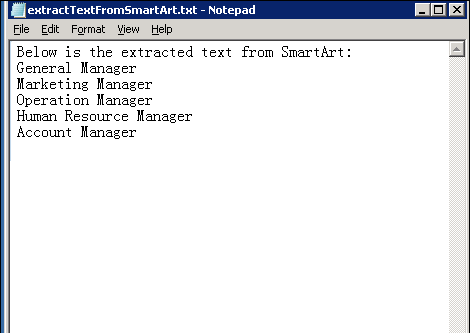
**Output**